Download NetMirror TVFree. 106 MB. No account.
The official APK for Android TV, Fire Stick, Google TV and Chromecast — eight streaming apps in one. Signed, VirusTotal-clean, and free forever. Or open it straight in your browser, no install at all.
One download.
Every screen you own.
The same 106 MB app works on every TV platform. Grab the APK to sideload, or just open the web app — no install needed on Samsung TVs and computers.
Download not working?
If the link won't open, your ISP is probably blocking the domain. Try these, in order:
- 1Open the link in an incognito / private window
- 2Check the Telegram channel for the current working URL (posted daily)
- 3On a TV, type the URL into the Downloader app, not a browser
- 4Use a reputable VPN (any country) to bypass the block
Download FAQ
The official build is posted on the NetMirror Telegram channel first, with its SHA-256, so you always get the genuine file. Avoid random third-party mirrors.
Will it run
on your TV? Almost certainly.
It's a light app that runs happily on modest hardware. If your TV box is from the last seven or eight years, you're good. Here's the exact spec.
Internet you'll need
On a slow line? Auto-quality and Data Saver keep it smooth at lower speeds — no settings headache.
Officially supported
Up and running
in under 3 minutes.
Five steps per device. Written for someone holding the remote for the first time — not for a developer.
Android TV & Google TV
5 steps · under 3 minutes
Install Downloader app
Open Google Play Store on your Android TV. Search 'Downloader by AFTVnews' and install — it is free.
Enable unknown sources
Settings → Device Preferences → Security & Restrictions → Unknown Sources → enable for Downloader.
Enter the APK URL
Open Downloader, tap the URL bar, type the netmirrorgg.com TV link, tap Go. The 106 MB APK downloads.
Tap Install
The system install prompt opens. Tap Install. The TV-optimised UI launches as soon as you tap Open.
Choose your language
Onboarding picks your preferred audio language. Set it once — the auto-pick applies it to every title.
Before you start
- Connect to Wi-Fi — avoid mobile hotspot for the download.
- Free at least 200 MB storage on the device.
- No account needed. Browse as a guest from first launch.
- Remote mic button works for voice search immediately after install.
APK Details
Is it safe? Is it legal?
Straight answers to both.
Two questions everyone asks before installing — and we'd rather you heard the real answer here than guess. No spin on either one.
No security vendors flagged this file on VirusTotal
d0f5a9e1bb905b151a26327aace31c0b391e32b9ff31945717f8250fd4646277Yes — and you can check
You don't have to take our word for any of it. Here's the proof, all verifiable:
Honestly? A grey area
We won't pretend otherwise. Here's exactly where it stands:
Streaming licensed catalogues outside an official subscription sits in legally ambiguous territory in most countries, including India.
We don't give legal advice — whether to use it is your decision to make, fully informed.
NetMirror doesn't bypass DRM or geo-restrictions. If a title is region-locked by the source, it stays locked here too.
Scanned on VirusTotal.
Zero detections.
Don't take our word for it — here's the actual VirusTotal report. The APK was run through every major antivirus engine and not one flagged it. This is the real, unedited result.
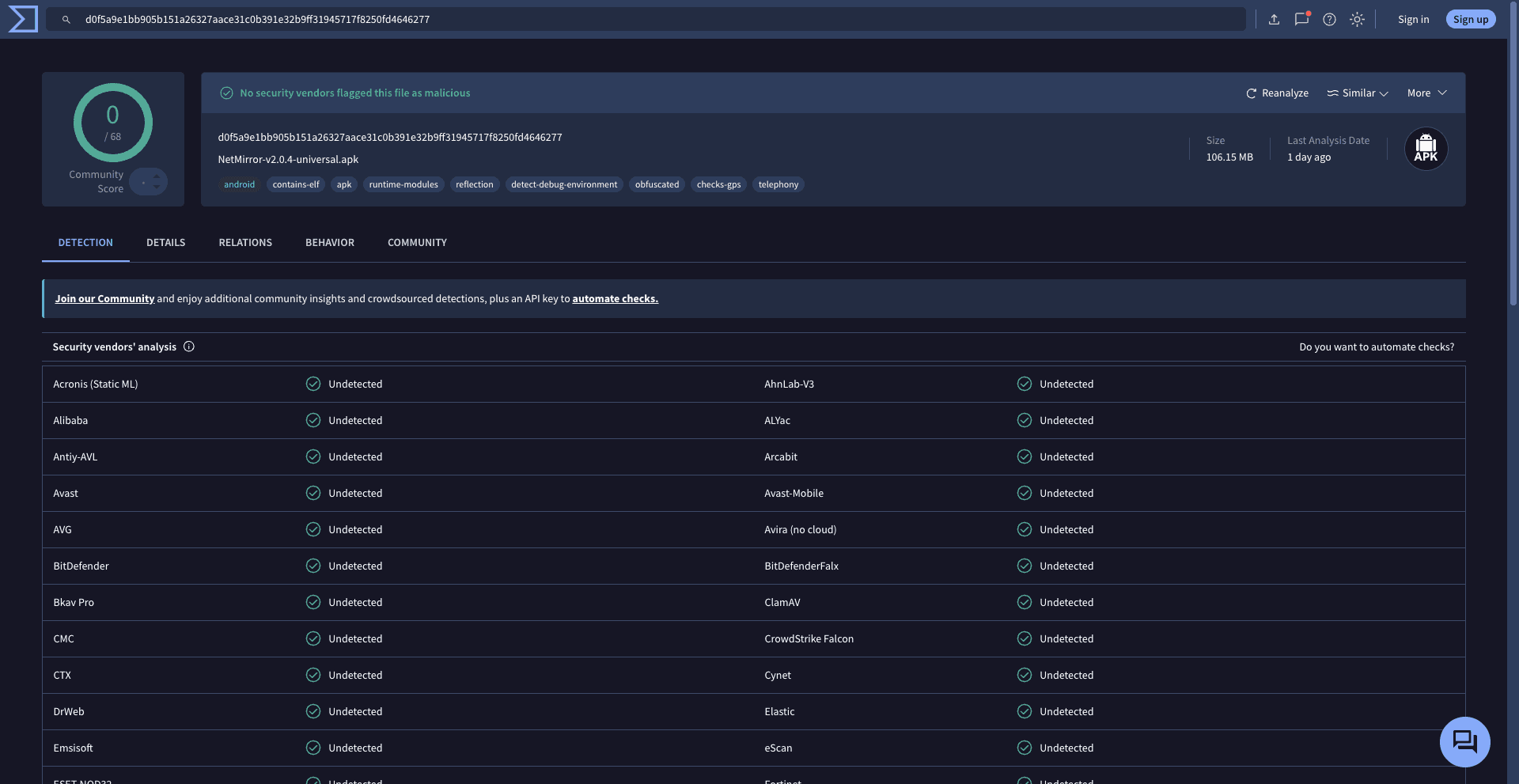
d0f5a9e1bb905b151a26327aace31c0b391e32b9ff31945717f8250fd4646277